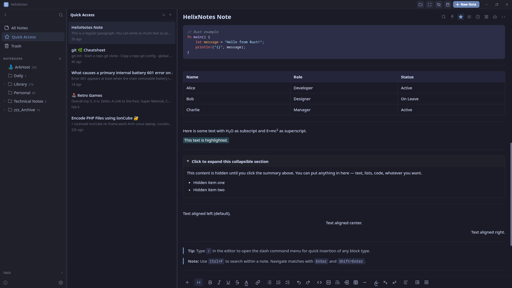
I built a note-taking app because the one I wanted didn’t exist. Clean UI, local .md files, no cloud, no account.
Built with Rust + Tauri 2.0 + SvelteKit. Full-text search powered by Tantivy. Graph view, AI writing tools (bring your own key), Obsidian import, version history.
Available for Linux (AppImage, APT, AUR), Windows, and macOS. Source: https://codeberg.org/ArkHost/HelixNotes
AI writing tools — improve, summarize, translate, and more (Anthropic / OpenAI)
why though
Fair question. Use case: you take rough notes during a meeting, no formatting, just raw thoughts. AI can clean them up, summarize, or restructure after the fact. It’s completely optional though. Disabled by default, doesn’t even show in the context menus unless you explicitly configure it in settings with your own API key. If you don’t want it, it’s like it doesn’t exist.
So, a feature for those who want it, but turned off out of the box for those who absolutely do not want it? Did I understand correctly?
Exactly. Off by default, invisible unless you enable it.
As ai features should be. You’re the dev?
Correct. Yes I am.
Cool. I appreciate this design decision. If only more went that route (looking at you, Microslop)
I see on the page it says you can bring an anthropic or openai key. Can I also point it at my own locally hosted model?
Not at this moment. Which local model would you like to see as an additional option?
I don’t know what is typical, but when I use AI locally I’ve been running llama-cpp with models grabbed from HF (ex. QwenCoder). Then in my VS code plugin (RooCode) I use the “OpenAI compatible” option to point it at my local server.
Not sure how hard that is to get working, but my hope is that “OpenAI Compatible” helps.
Ollama, lmstudio, llama.Cpp
Ollama is now also possible.
If it were me, I’d have chosen a different name to avoid confusion with helix the editor.
Not to be confused with helix the TUI text editor
Correct, this has nothing to do with the helix TUI text editor in any way.
That was gonna be my question.
Whats the difference between helixeditor.com and helix-editor.com, do you know if they are different projects?
Funny that you pointed this out. I didn’t actually know about the two distinct sites. The “missing” hyphen in my url was a confusing accident; I just assumed they revamped the website poorly 🤣. I had to check the install instructions and GitHub link before posting
They are the same; both refer to https://github.com/helix-editor/helix
If you want to try HelixNotes, be aware it overwrites the front-matter of notes you open (view only, no edit needed).
Hi ArkHost,
Obsidian user here. I tried HelixNotes for a couple of minutes and here’s my feedback:
- I like that you support compatibility/converting Obsidian vaults. I wish you would at least support Obsidian’s wiki links directly. I won’t convert all my notes just to try if I like your editor.
- View mode doesn’t seem to really do anything. Ah wait, seems like I can only click links in view mode (no visual distinction between normal editor and view-mode apart from the tiny
view modebadge). But that opens the linked note in my default.mdviewer, not the HelixEditor itself. IMO view-mode should be visually distinct and also work together with source-mode (so I can edit in source mode and then click view-mode to see the rendered note). - I like the simple look, although the UI is not as polished compared to Obsidian.
- I need Math support (
$ ... $). - I hate that you update notes front-matter even if I just view and not edit them. Only change notes I am editing myself. I just had a look and now you changed the format of my notes. Re front-matter it would also be good if that behavior is documented somewhere.
- I closed my vault (clicked on the folder icon in the top right) and wanted to reopen it, but got an error:
Failed to acquire LockFile: LockBusy. - The graph view opened but stayed empty.
Feel free to use my feedback however you want, or don’t. Personally, there’s more than one deal-breaker for me to switch from Obsidian to HelixNotes, without even considering the nice-to-have features added by all the plug-ins. I recommend you to listen to people who are more likely to use your editor than me, or are already using it. I hope my comment doesn’t come over too negatively. I tried to give honest feedback why personally I won’t use HelixNotes anytime soon. I wish you all the best.
Appreciate the honest feedback, doesn’t come over negatively at all, this is exactly what helps improve the app.
- Obsidian wiki links not converting properly during import: that’s a bug, will be fixed in the next release.
- View mode, math support, frontmatter behavior, and the other UX points: all noted and will be considered. So far I’ve focused on features I use personally, but if something makes sense, improves the app, and keeps it focused without bloat, I just implement it.
- The LockFile bug and empty graph view: I haven’t seen this behavior yet but I’ll look into it.
HelixNotes isn’t trying to be a replacement for Obsidian. It was a replacement for Obsidian for me, but different people have different needs. Thanks for taking the time.
You even overwrite previously existing front-matters. From just looking at a note. This is a fucking no-go! Luckily I was able to revert all the unwanted changes HelixNotes applied to my vault.
This is a warning for everyone who wants to try HelixNotes with an existing vault.
The import dialog warns you to make a backup before running as it modifies files in place. That said, the frontmatter overwrite on just viewing a note is a valid bug. I’ll fix that, notes should only be modified when you actually edit them.
Fixed in v1.1.0
Oh hey I’ve been looking for “obsidian but with version history “ for a bit now.
Give HelixNotes a try :)
Thanks for all the feedback everyone. Just shipped v1.1.0 based on what was reported here today:
- Obsidian wiki link import fix
- macOS Cmd key shortcuts (was showing Ctrl)
- Frontmatter no longer modified on notes you don’t edit
- KaTeX math support
- Daily Notes
- Tag management (single + batch)
- View mode toggle + focus mode improvements
- Source mode search
- Notebook delete confirmation
- Collapsible sidebar tags
Note taking App, AI in the front page… I don’t think you understand the point of taking notes.
AI is optional, disabled by default, and doesn’t even show in the UI unless you enable it. The app works fully offline with zero AI involvement.
Your website says “No sync. No lock-in. No bullshit”
Would you mind elaborating on the thought there? Why no sync?
I use obsidian with self hosted live sync, my notes are mine and they live on my hardware, but they are always in sync between my devices. If I’m on my desktop and take notes, I can pull them up on my laptop or even my phone. With this, I can’t reference my notes (or update them) until I’m back on my desktop.
The line “No sync. No lock-in. No bullshit” tells me you’re opposed to it on principal, meaning you don’t intend to ever add the ability to sync, and that’s a nonstarter for me and a lot of people I image. I’d love to migrate from obsidian to something open source, and I’d love to potentially spend time working on contributing a self hosted live sync like feature, but I need to know if my work and pull request will be immediately rejected on a principal I’m not sure I understand?
Good question. “No sync” means no built-in cloud sync - not that sync is impossible. Your notes are plain .md files in a folder, so you can sync them with Syncthing, Nextcloud, rsync, Git, or anything else you already use. The app watches the filesystem for external changes and picks them up automatically.
The philosophy is: I don’t decide where your files go. You do.
As for contributions - absolutely welcome. PRs won’t be rejected on principle. If you want to work on a self-hosted sync feature, open an issue on Codeberg and let’s discuss the approach first. I’d love to see it.
Are there plans for mobile apps? In particular, obsidian and nextcloud don’t seem to work well together on android. Changes made to files via obsidian don’t get picked up by nextcloud unless I manually go sync the file. This might just be nextcloud’s app dropping the ball.
Sounds good, I’m trying out the app and seeing if I can really use it to replace obsidian, and I might dedicate some time to contribute if I end up using it. I agree with your assessment that obsidian’s customization with its plugin eco system leads to it becoming a side project that you have to baby instead of just a note taking app.
I don’t use a lot of plugins on obsidian, but I use rely on a few that make organizing notes easier, mainly:
- Daily notes: I really like being able to click one button to create a note with a date and organized into date folders, these are usually quick notes that reference bigger notes. Not being able to do it with a click means I just won’t do it at all, so my quick notes could very quickly become a giant list of unorganized files in the vault root.
- Templates: not a huge deal, I can manually apply templates from a template .md file, but it’s a nice feature.
On sync, two problems with using “whatever” to sync entire vault:
- I have to install and configure syncing on every device, and make sure they’re connected
- Merge conflict and sync order! I used to use seafile I sync, and I can’t tell you how frustrating it was to lose entire notes because they were overwritten externally.
Great feedback.
- Daily notes - not there yet but it’s a straightforward feature to add. I’ll put it on the roadmap.
- Templates - same, noted.
- Sync conflicts - fair point. HelixNotes watches the filesystem for external changes, but conflict resolution when two devices edit the same note is a real problem with any file-based sync. Syncthing handles this better than most (it creates conflict copies instead of overwriting), but it’s not perfect.
If you end up trying it and want to contribute, open issues on Codeberg for what you’d like to see. Contributions are very welcome.
Oh, forgot to ask, are mobile apps on the roadmap?
Obviously your chosen tech stack makes that difficult, but notes on the go are pretty essential.
I’m thinking about the mobile app in terms of how already. But it’s definitely on the roadmap.
I assume you could use syncthing to sync the notes.
Notix. Notes + helix avoid confusion with the other app, Notix
Does this have anything to do with the Helix text editor?
No, completely separate project. Just a coincidence in naming.
Looks like an interesting project!
Could you please consider publishing it to Flathub?
It’s on the list. Flatpak packaging is coming.
Not the developer, though that could be an option for sure. I’d highly recommend looking at the security holes for Flatpak, and it’s got a ton of them. They’re getting fixed, though I don’t even have Flatpak installed on my machine.
I’ve been hearing people suggest staying away from flatpaks, but I haven’t heard the reasons why. I guess that’s it?
Are there security issues specific to Flatpak? I would have thought it’d be more secure than Appimage, since it’s sandboxed.
While it is sandboxed, a Flatpak can have this happen to it (from the time): https://flatkill.org/
How does this differ from every other distribution method, though? You can just as easily do something malicious with an Appimage or Debian/rpm package.
I just downloaded. Looks amazing. I will try it out. Do you have a Patreon Page or something?
Thanks! No Patreon yet, but I’ll set something up. For now, the best support is feedback and bug reports.
So far it has been smooth sailing. But I will report. Only things Iam missing are:
- the ability to open notes side by side or alternatively to open a second instance of the app.
- ability to swap/move line up/down via shortcuts with arrow keys
- showing line numbers
maybe you can consider these for the future.
Great! Thanks for the feedback.
All 3 enhancements noted. Will be implemented in next release.
Update: The line shortcuts and line numbers will be in the next release. The side-by-side/split view requires a significant architecture refactor, so that one will take longer - it’s on the roadmap but not for the immediate next release.
Wow, that was really fast. Thank you very much!
You can now open a note in a separate window. This has been added in v1.1.6, along with other fixes and feature additions.
Is it possible to view files in the root of the vault?
Also, is it possible to show non.mdfiles?My use case for the second question is that I have
.pdfand.xmlthat acompanies my notes. Having HelixEditor showing them as well (or opening them in system default editor) would be nice.Not ideal since you can’t easily sort by folder hierarchy but you can see your root files in All Notes.
What is about obsidian?
Mac user her. I’ve been using Markflowy after MacDown stopped development. I will give this a shot.
Thank you for your work.
Hi OP. I am really enjoying using HelixNotes.
I love the way it looks and all the features. I was able to use the same folder I use MarkFlowy and Marknote.
My only critique is the
Ctrlkey in Windows and Linux menu shortcuts is usually changed toCmdfor Mac. It really isn’t a big deal but I think a lot of Mac users will notice this instantly. I tried creating an note withCmd+Nsince is the default for all other Mac apps. I saw the Shortcuts in the Info section and I was hoping you could customize the Keyboard Shortcuts, but you can’t.It isn’t a big deal with me. So far I am enjoying this more than MarkFlowy and Marknote. If you don’t change for whatever reason, I understand and I will continue to use your HelixNotes.
Again thank you for your work.
Mac Cmd shortcuts fixed in v1.1.0, just shipped. Thanks for reporting it.
Me again. Last time tonight, I promise.
My favorite features so far, making the edit toolbar disappear in source mode and Focus mode. Quick access is also really useful.
One more thing I don’t like, it was adding a header to my edited notes.
Example:
---
id: "9242199e-992b-4c58-9b4f-85a6949d424d"
title: "Books"
tags: []
pinned: false
created: 2026-02-15T04:32:13.600656+00:00
modified: 2026-02-15T04:32:17.240423+00:00
---
This doesn’t look great in MacOS preview. This might be one of those things that it was simplest to just add this directly to the file rather than creating some kind of database or a bunch of dot files. Again, not a deal breaker for me. Would adding it to the bottom be possible instead?
Thank you.
Hi, not OP, but: that’s known as frontmatter, it’s somewhat widespread, and thus I suspect that it’s much more difficult to have it live at the end of your markdown files than in a separate file or db altogether - unless OP is already rolling their own markdown parser.
Interesting. Thank you for the info.
Really appreciate the detailed feedback.
You’re right about the Mac shortcuts - Cmd should replace Ctrl on macOS. That’s a bug, I’ll fix it.
As for the frontmatter - Jayjader is correct, it’s standard markdown frontmatter. It’s how HelixNotes tracks metadata without using a database or sidecar files. Moving it to the bottom would break compatibility with every other markdown tool that reads frontmatter. But I understand it’s not pretty in a plain preview - that’s the tradeoff for keeping everything in plain .md files with no hidden database.
Glad you’re enjoying it. Keep the feedback coming, this is exactly what helps improve the app.
Thank you for the explanation.
I will continue to use it and provide feedback. So far, really great.
I nearly take all my notes in markdown. I am always excited to try another open source markdown program.
HelixNotes is super polished.
Thanks!
Thanks, appreciate it!