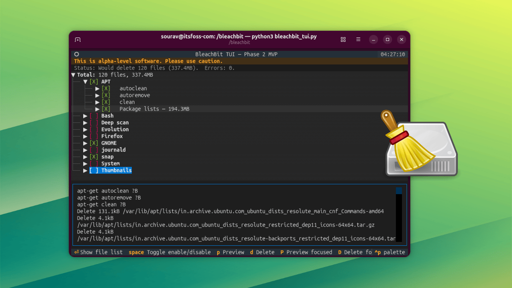
For very small values of “famous”.
It’s more famous for people that where around 15 years ago when disk space was more scarce.
I understand its use on an uncontrollably bloated Windows system, but what is its use case on a Linux system?
Show is better than tell:


Often, when viewing images, firefox “caches” the image in order to be able to load it faster when visiting that site again. Left unchecked, this cache (of images and other assets) can pretty much infinitely grow. Many other apps also have big caches.
Bleachbit actually is useful. Instead of hunting through your system and accidentally rm -rfing the wrong folder and losing all your precious firefox profile data, it enables you to quickly nuke all caches, freeing up a significant amount of space. I would probably free up 15gb+ if I ran it based on these images.
EDIT: just ran it. I freed up 6gb of space. Not 15gb. Huh. Still, pretty good though, and if you are space starved (I used to use a machine with only 32 gb of storage TOTAL), then it’s useful to keep things slim.
Why trust this tool over the browser itself, all of which have options to control their own caches?
Because the browser was just an example, this tool handles a lot of different softwares. Sometimes it can even be software you deleted that left cache behind.
I trust this tool as it has been around for a very long time, is well known and open source. But I haven’t used it in years as drive space is now cheap so I’m not trying to reclaim every last bit of it. It can still be useful in some situations but no need to use it regularly.
Cuz there are more than just browser caches I would like to nuke.
Cuz bleachbit is more granular, seperating out site data and cookies, enabling me to delete the 1gb alpine docker image downloaded by https://github.com/MercuryWorkshop/anuraOS without logging me out of anything that is using cookies. Firefox doesn’t appear to have that option.
Edit: cuz I use multiple browser profiles, and this can delete cache from all of them at once instead of me having to do it once per profile 2-3 times.
Other software has similar behavior and this could do the same thing for, conceivably, all of them.
I could see a world where I would run something like this every 5 years and be surprised how much crap just accumulated over that time.
Exactly my question, haven’t had to do much cleaning on a Linux system yet, but haven’t asked the question either since I never felt the need I guess
Yeah. I guess if we went through all its options to make sure it doesn’t delete something that would break the system… And there is the “clean empty space” option, or whatever it’s called, but we have more direct options, so, still “no”. 😅
In case Hillary Clinton wants to switch to Linux and delete her emails /s
I’m trying to sleep, stop making me laugh.
I’d still teach her
dd if=/dev/urandom of=/var/spool/mail/hillarypillary
When I started with Linux like 15 years ago, I felt I needed a ccleaner replacement and it’s rarely ever been necessary. Something I’ll run once in however many years for no good reason
Run it with sudo, and you too can recover a whopping 4.3mb of space!
Say what?
Perhaps Stacker and defrag arrive next!This has to be a joke?